satellite 모델 — 20장 v3 + 생산 매니페스트(v2 스키마)

좌 = 판정 구조(패키지→core→위성) · 우 = 발급 종수 상세(궤도 온전성) + 매니페스트 YAML(노드 집합 명부 · 패키지 선언 · 발급 계보 · cells=deferred · delegated_to_iis=계약 ⓕ)

174975 패키지 1

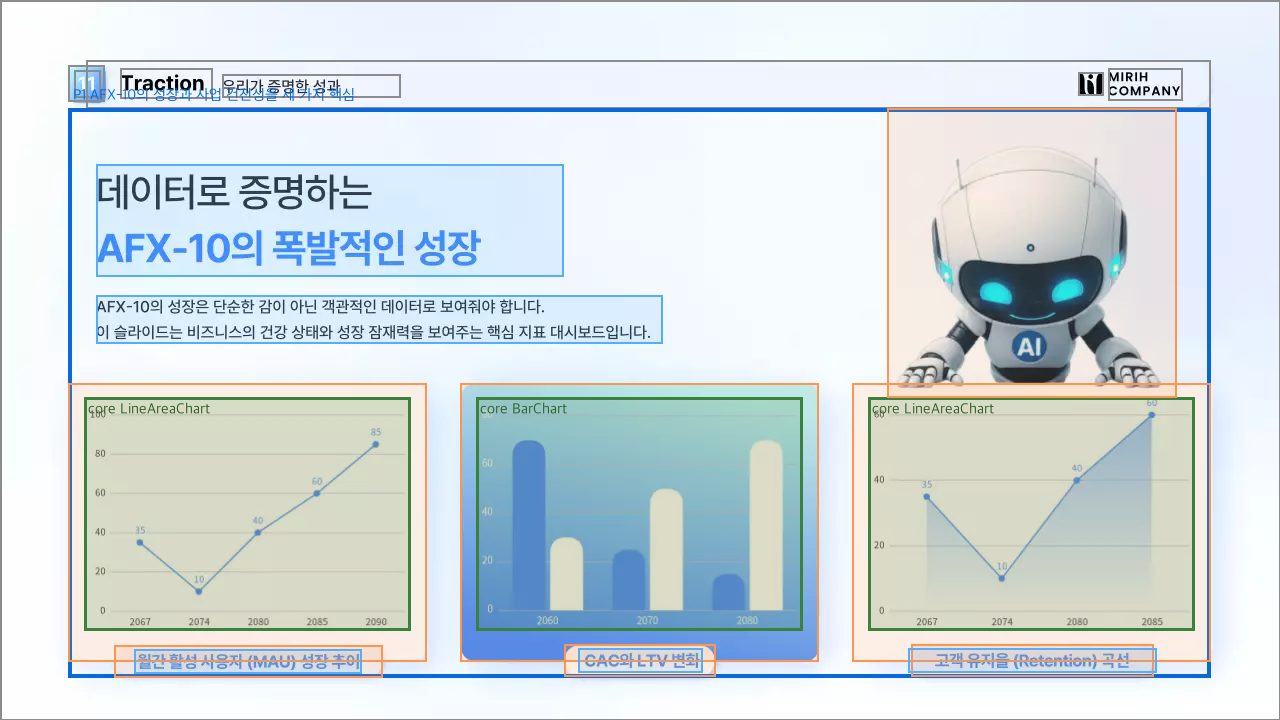
P1. AFX-10의 성장과 사업 건전성을 세 가지 핵심 지표 차트로 제시한다 결합 증거: 세 차트가 동일한 카드 크기와 가로 정렬로 묶여 있으며, 제목과 설명이 하나의 성장 대시보드라는 공통 질문 아래 MAU·CAC/LTV·Retention의 세 지표를 함께 제시한다.
core 0 · LineAreaChart n13(Chart)
deco n12(ExtendableShape) n14(ExtendableShape) — MAU 추이 차트의 카드 프레임과 캡션 배경을 이룬다
desc n15(Text "월간 활성 사용자 (MAU") — MAU 추이 차트의 내용을 라벨로 설명한다
core 1 · BarChart n21(Chart)
deco n20(ExtendableShape) n22(ExtendableShape) — CAC와 LTV 비교 차트의 카드 프레임과 캡션 배경을 이룬다
desc n24(Text " CAC와 LTV 변화") — CAC와 LTV 비교 차트의 내용을 라벨로 설명한다
core 2 · LineAreaChart n17(Chart)
deco n16(ExtendableShape) n18(ExtendableShape) — 고객 유지율 곡선 차트의 카드 프레임과 캡션 배경을 이룬다
desc n19(Text "고객 유지율 (Retent") — 고객 유지율 곡선 차트의 내용을 라벨로 설명한다
패키지 공유 위성 (anchor=region · 다핵 전용)
desc n10(Text "데이터로 증명하는 AFX-") n11(Text "AFX-10의 성장은 단순") — 세 성장 지표 대시보드의 주제와 해석 맥락을 설명한다
deco n23(Bitmap) — 성장 데이터 대시보드의 AI 분위기를 꾸민다
장 크롬: n1() n2(Photo) n3(ExtendableShape) n4(ExtendableShape) n5(Text "11") n6(Text "Traction") n7(Text "우리가 증명한 성과") n8(VectorGraphic) n9(Text "MIRIH COMPANY") — 전체 배경과 상단 장 번호·섹션명·문서 슬로건·회사 로고로 이루어진 장 크롬

174985 패키지 1

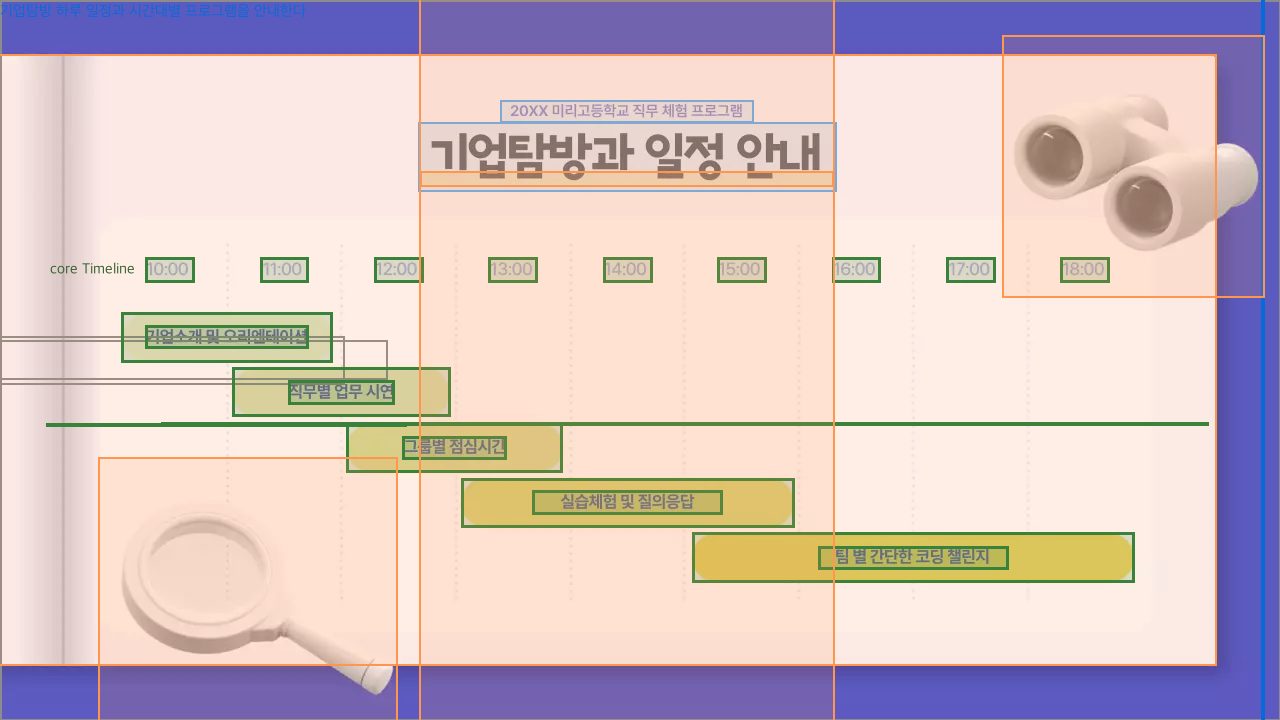
P1. 기업탐방 하루 일정과 시간대별 프로그램을 안내한다
core 0 · Timeline n7(Line) n8(Line) n9(Line) n10(Line) n11(Line) n12(Line) n13(Line) n14(Line) n17(Text "18:00 ") n18(Text "17:00 ") n19(Text "16:00 ") n20(Text "15:00 ") n21(Text "14:00 ") n22(Text "13:00 ") n23(Text "12:00 ") n24(Text "11:00 ") n25(Text "10:00 ") n26(ExtendableShape) n27(Text "팀 별 간단한 코딩 챌린지") n28(ExtendableShape) n29(Text "실습체험 및 질의응답") n30(ExtendableShape) n31(Text "그룹별 점심시간") n32(ExtendableShape) n33(Text "직무별 업무 시연") n34(ExtendableShape) n35(Text "기업소개 및 오리엔테이션")
desc n36(Text "기업탐방과 일정 안내") n37(Text "20XX 미리고등학교 직무") — 일정 타임라인의 제목과 프로그램 맥락을 소개한다
deco n2(ExtendableShape) n5(ExtendableShape) n6(ExtendableShape) n15(Bitmap) n16(Bitmap) — 타임라인을 담는 카드 프레임과 탐방 분위기 장식이다
장 크롬: n1() n3(Bitmap) n4(Bitmap) — 슬라이드 전체 배경 및 문서 층위의 배경 효과

175006 패키지 1

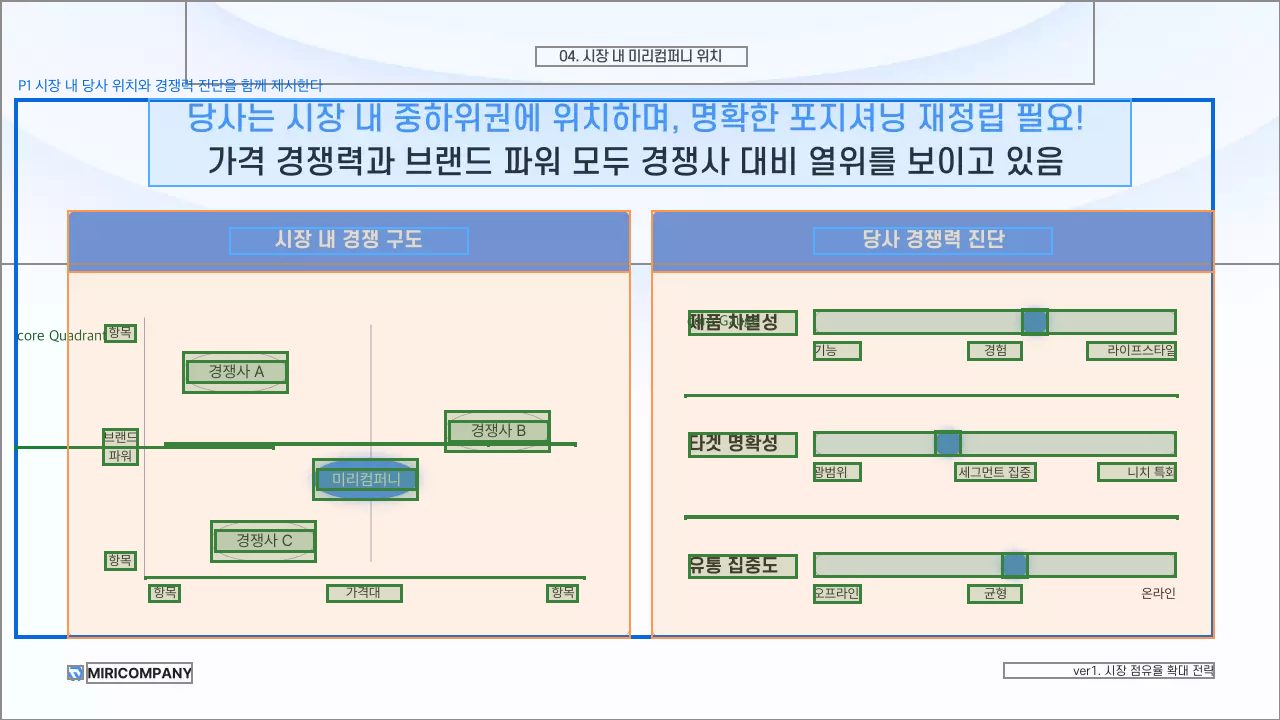
P1. 시장 내 당사 위치와 경쟁력 진단을 함께 제시한다 결합 증거: 좌측 경쟁 구도 좌표와 우측 당사 경쟁력 척도가 하나의 포지셔닝 판단을 위한 나란한 두 패널로 묶여 있다.
core 0 · Quadrant n12(Line) n13(Line) n14(Line) n15(Line) n16(Text "항목") n17(Text "항목") n18(Text "브랜드 파워") n19(Text "항목") n20(Text "항목") n21(Text "가격대") n22(ExtendableShape) n23(Text "경쟁사 B") n24(ExtendableShape) n25(Text "경쟁사 A") n26(ExtendableShape) n27(Text "경쟁사 C") n28(ExtendableShape) n29(Text "미리컴퍼니")
deco n7(ExtendableShape) n8(ExtendableShape) — 경쟁 구도 차트의 패널 프레임과 헤더를 이룬다
desc n9(Text "시장 내 경쟁 구도") — 좌측 사분면 차트의 제목이다
core 1 · Gauge n30(Line) n31(Line) n32(ExtendableShape) n33(ExtendableShape) n34(Text "제품 차별성") n35(Text "기능") n36(Text "경험") n37(Text "라이프스타일") n38(ExtendableShape) n39(ExtendableShape) n40(Text "타겟 명확성") n41(Text "광범위") n42(Text "세그먼트 집중") n43(Text "니치 특화") n44(ExtendableShape) n45(ExtendableShape) n46(Text "유통 집중도") n47(Text "오프라인") n48(Text "균형")
deco n4(ExtendableShape) n5(ExtendableShape) — 경쟁력 진단 게이지의 패널 프레임과 헤더를 이룬다
desc n6(Text "당사 경쟁력 진단") — 우측 게이지 묶음의 제목이다
패키지 공유 위성 (anchor=region · 다핵 전용)
desc n11(Text "당사는 시장 내 중하위권에") — 두 진단 패널의 공통 결론을 요약한다
장 크롬: n1() n2(ExtendableShape) n3(ExtendableShape) n10(Text "ver1. 시장 점유율 확") n50(VectorGraphic) n51(Text "MIRICOMPANY") n52(Text "04. 시장 내 미리컴퍼니") — 슬라이드 배경 장식, 문서 로고·푸터 및 장 구분 제목

175088 패키지 1

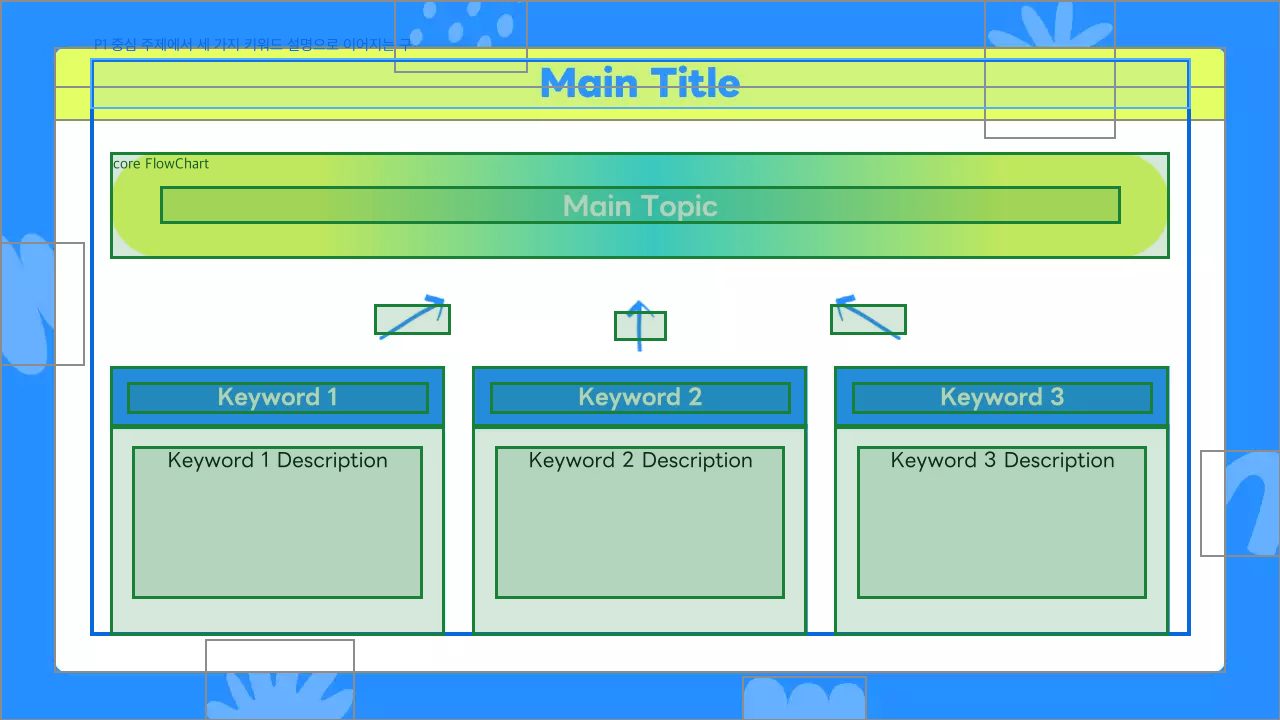
P1. 중심 주제에서 세 가지 키워드 설명으로 이어지는 구성
core 0 · FlowChart n11(Bitmap) n12(Bitmap) n13(Bitmap) n14(ExtendableShape) n15(ExtendableShape) n16(ExtendableShape) n17(ExtendableShape) n18(ExtendableShape) n19(ExtendableShape) n20(ExtendableShape) n21(Text "Keyword 3 Desc") n22(Text "Keyword 2 Desc") n23(Text "Keyword 1 Desc") n24(Text "Keyword 1") n25(Text "Main Topic") n27(Text "Keyword 2") n28(Text "Keyword 3")
desc n26(Text "Main Title") — 전체 주제 흐름을 소개하는 장 제목
장 크롬: n1() n2(VectorGraphic) n3(VectorGraphic) n4(VectorGraphic) n5(VectorGraphic) n6(VectorGraphic) n7(VectorGraphic) n8(ExtendableShape) n9(ExtendableShape) n10(ExtendableShape) — 슬라이드 배경, 가장자리 장식, 전체 캔버스 및 상단 제목 바

174966 패키지 1

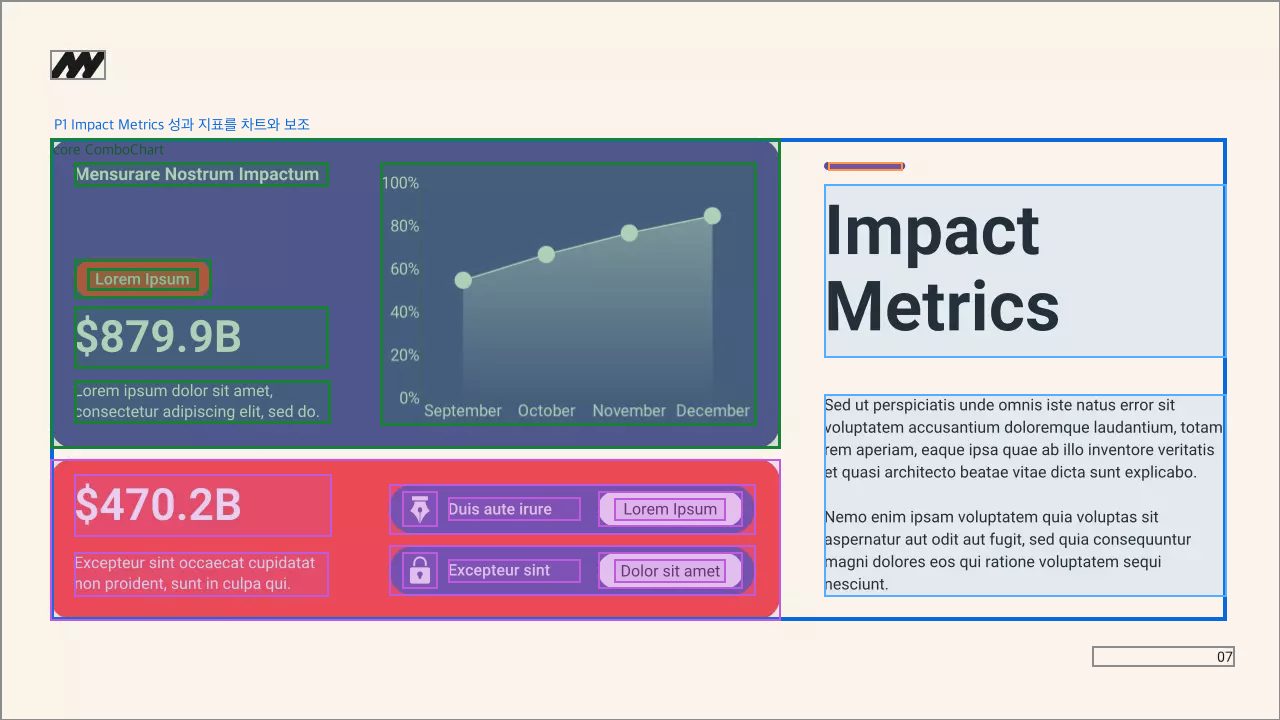
P1. Impact Metrics 성과 지표를 차트와 보조 KPI로 요약한다
core 0 · ComboChart n3(ExtendableShape) n10(ExtendableShape) n13(Chart) n18(Text "Mensurare Nost") n19(Text "$879.9B") n20(Text "Lorem ipsum do") n21(Text "Lorem Ipsum")
desc n16(Text "Impact Metrics") n17(Text "Sed ut perspic") — 성과 지표 대시보드의 제목과 설명을 제공한다
deco n12(Line) — 제목 영역을 장식한다
typed · List n2(ExtendableShape) n4(ExtendableShape) n5(ExtendableShape) n6(ExtendableShape) n7(ExtendableShape) n8(VectorGraphic) n9(VectorGraphic) n15(Text "$470.2B") n22(Text "Lorem Ipsum") n23(Text "Duis aute irur") n24(Text "Dolor sit amet") n25(Text "Excepteur sint") n26(Text "Excepteur sint") — 차트의 성과를 보조 KPI와 항목 목록으로 요약한다
장 크롬: n1() n11(VectorGraphic) n14(Text "07") — 전체 배경, 로고, 쪽번호

175099 패키지 1

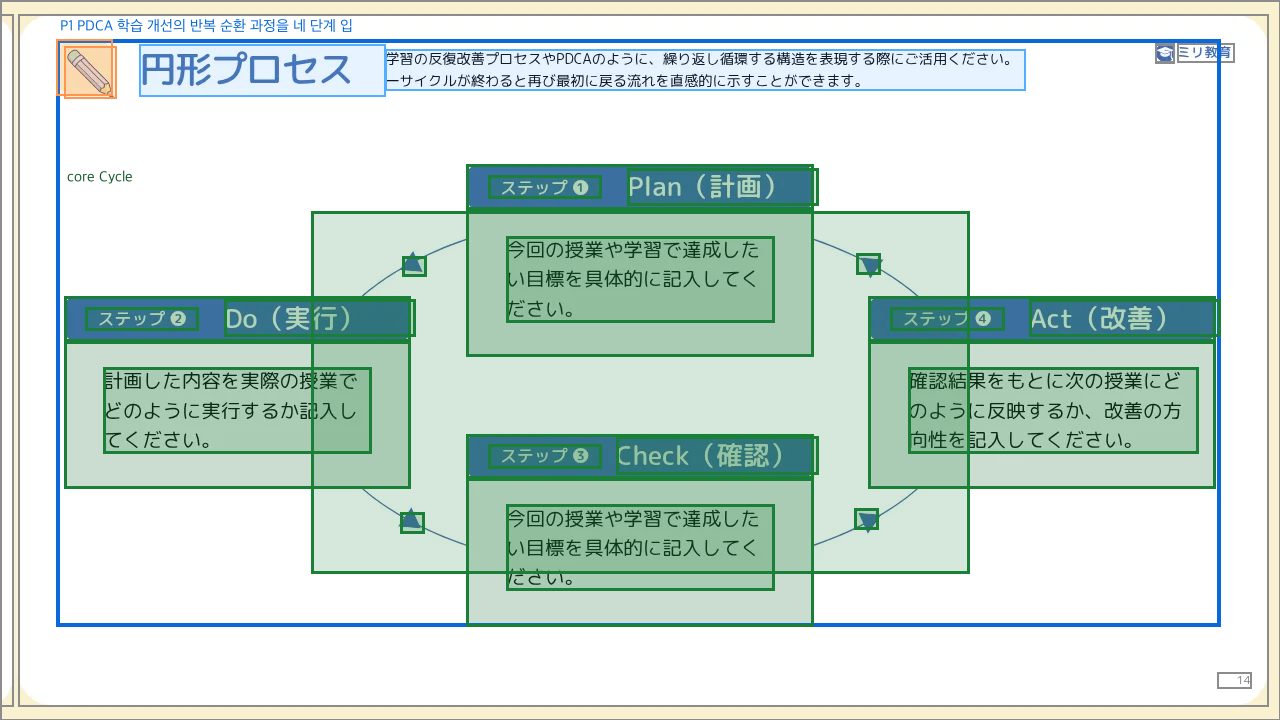
P1. PDCA 학습 개선의 반복 순환 과정을 네 단계 입력 카드로 안내한다
core 0 · Cycle n3(ExtendableShape) n4(Text " Do(実行) ") n5(Text "ステップ ❷") n7(Text " Plan(計画)") n8(Text " Act(改善)") n9(ExtendableShape) n10(Text "今回の授業や学習で達成したい") n11(ExtendableShape) n12(Text "Check(確認)") n15(ExtendableShape) n16(Text "計画した内容を実際の授業でど") n21(ExtendableShape) n22(ExtendableShape) n23(ExtendableShape) n24(Text "ステップ ❹") n25(Text "ステップ ❶") n26(ExtendableShape) n27(ExtendableShape) n28(Text "確認結果をもとに次の授業にど") n30(ExtendableShape) n31(ExtendableShape) n32(ExtendableShape) n33(Text "ステップ ❸") n34(ExtendableShape) n36(Text "今回の授業や学習で達成したい")
desc n17(Text "円形プロセス") n29(Text "学習の反復改善プロセスやPD") — 순환 프로세스의 제목과 활용 설명을 제공한다
deco n2(ExtendableShape) n35(Bitmap) — 제목 영역을 꾸민다
장 크롬: n1() n6(ExtendableShape) n14(ExtendableShape) n13(Text "14") n18(Text "ミリ教育") n19(ExtendableShape) n20(VectorGraphic) — 슬라이드 배경·가장자리 장식, 로고, 쪽번호

175120 패키지 2

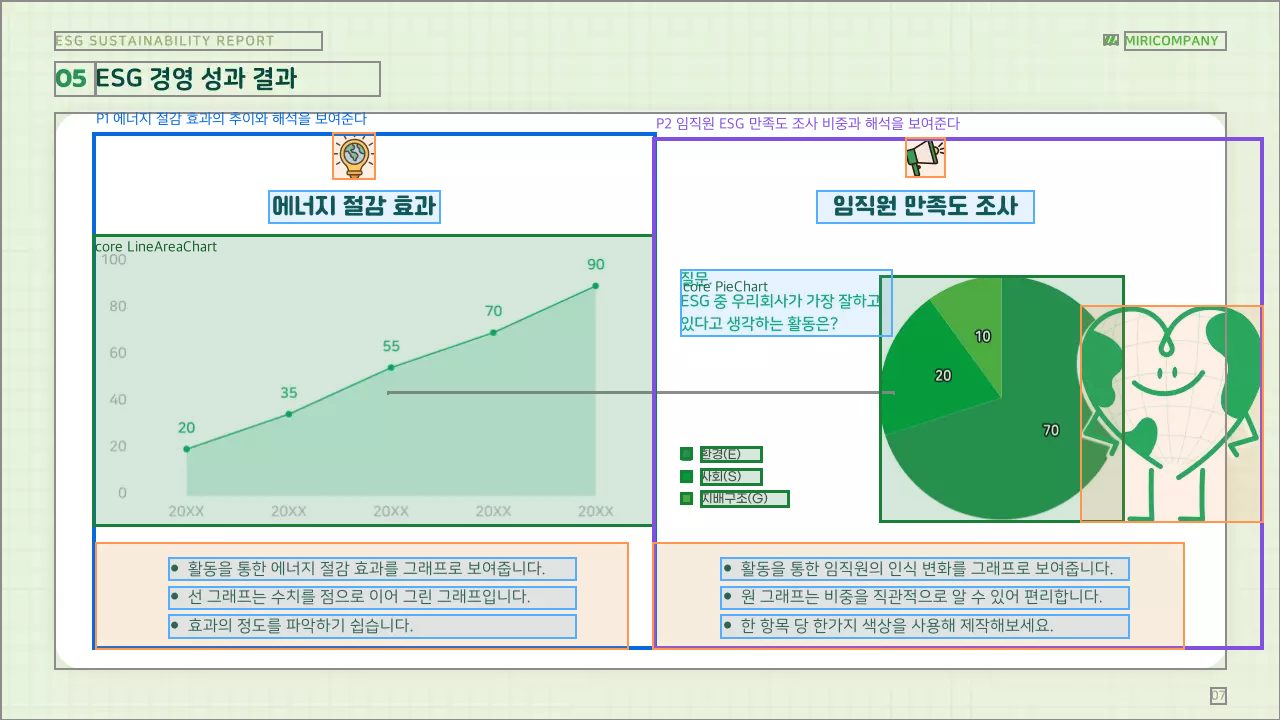
P1. 에너지 절감 효과의 추이와 해석을 보여준다
core 0 · LineAreaChart n6(Chart)
deco n14(VectorGraphic) — 에너지 절감 주제를 상징한다
desc n21(Text "에너지 절감 효과") — 차트의 주제를 제시한다
deco n4(ExtendableShape) — 설명 문단의 배경 프레임을 이룬다
desc n22(Text "활동을 통한 에너지 절감 ") n23(Text "선 그래프는 수치를 점으로") n24(Text "효과의 정도를 파악하기 쉽") — 선·영역 차트의 의미와 읽는 법을 설명한다
P2. 임직원 ESG 만족도 조사 비중과 해석을 보여준다
core 0 · PieChart n7(Shape) n8(Shape) n9(Shape) n10(Chart) n25(Text "환경(E)") n26(Text "사회(S)") n27(Text "지배구조(G)")
deco n15(VectorGraphic) — 조사·공지 주제를 상징한다
deco n13(VectorGraphic) — 임직원 만족도 주제의 분위기를 꾸민다
desc n28(Text "임직원 만족도 조사") — 원형 차트의 조사 주제를 제시한다
desc n29(Text "질문. ESG 중 우리회사") — 차트가 답하는 설문 질문을 제시한다
deco n11(ExtendableShape) — 설명 문단의 배경 프레임을 이룬다
desc n30(Text "활동을 통한 임직원의 인식") n31(Text "원 그래프는 비중을 직관적") n32(Text "한 항목 당 한가지 색상을") — 원형 차트의 의미와 읽는 법을 설명한다
장 크롬: n1() n2(VectorGraphic) n3(ExtendableShape) n5(VectorGraphic) n12(Line) n16(Text "07") n17(Text "05") n18(Text "ESG 경영 성과 결과") n19(Text "MIRICOMPANY") n20(Text "ESG Sustainabi") — 슬라이드 전체 배경·공통 흰 프레임·로고·문서/장 제목·쪽번호 및 공통 장식선

175128 패키지 1

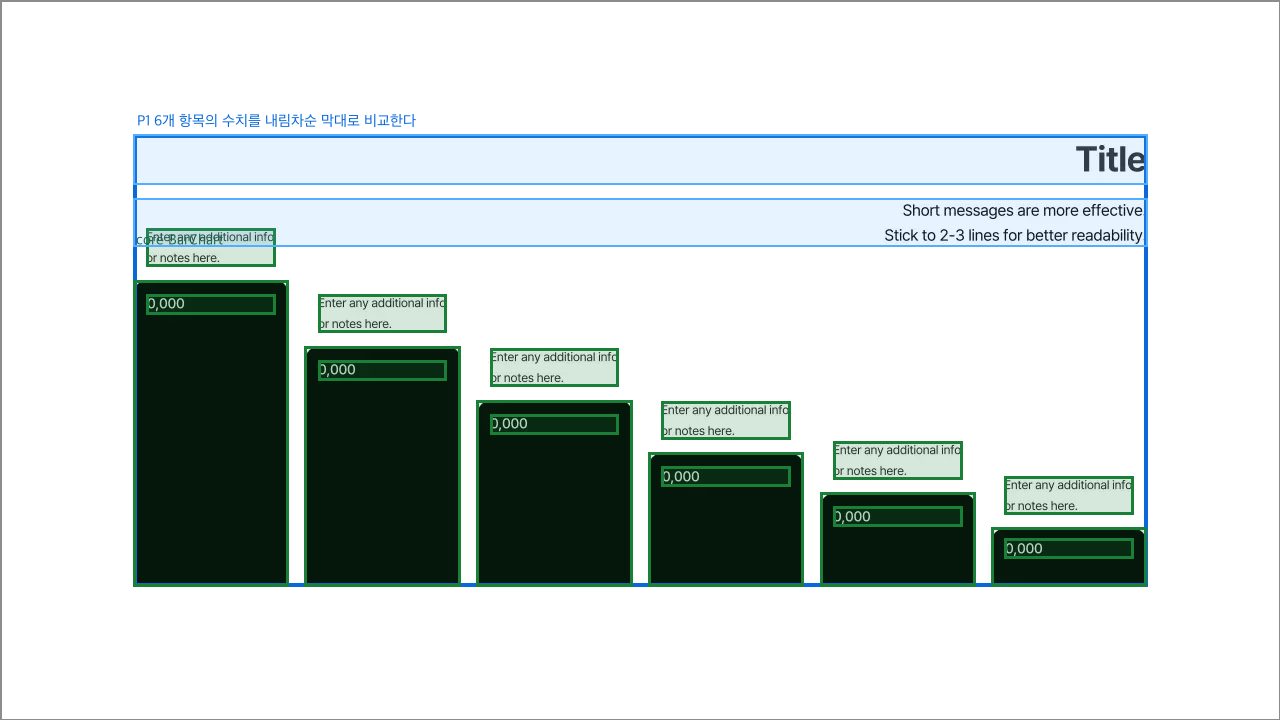
P1. 6개 항목의 수치를 내림차순 막대로 비교한다
core 0 · BarChart n4(ExtendableShape) n5(Text "0,000") n6(Text "Enter any addi") n7(ExtendableShape) n8(Text "0,000") n9(Text "Enter any addi") n10(ExtendableShape) n11(Text "0,000") n12(Text "Enter any addi") n13(ExtendableShape) n14(Text "0,000") n15(Text "Enter any addi") n16(ExtendableShape) n17(Text "0,000") n18(Text "Enter any addi") n19(ExtendableShape) n20(Text "0,000") n21(Text "Enter any addi")
desc n3(Text "Title") n2(Text "Short messages") — 막대 차트의 주제와 간단한 안내를 제공한다
장 크롬: n1() — 슬라이드 전체 배경

175293 패키지 1

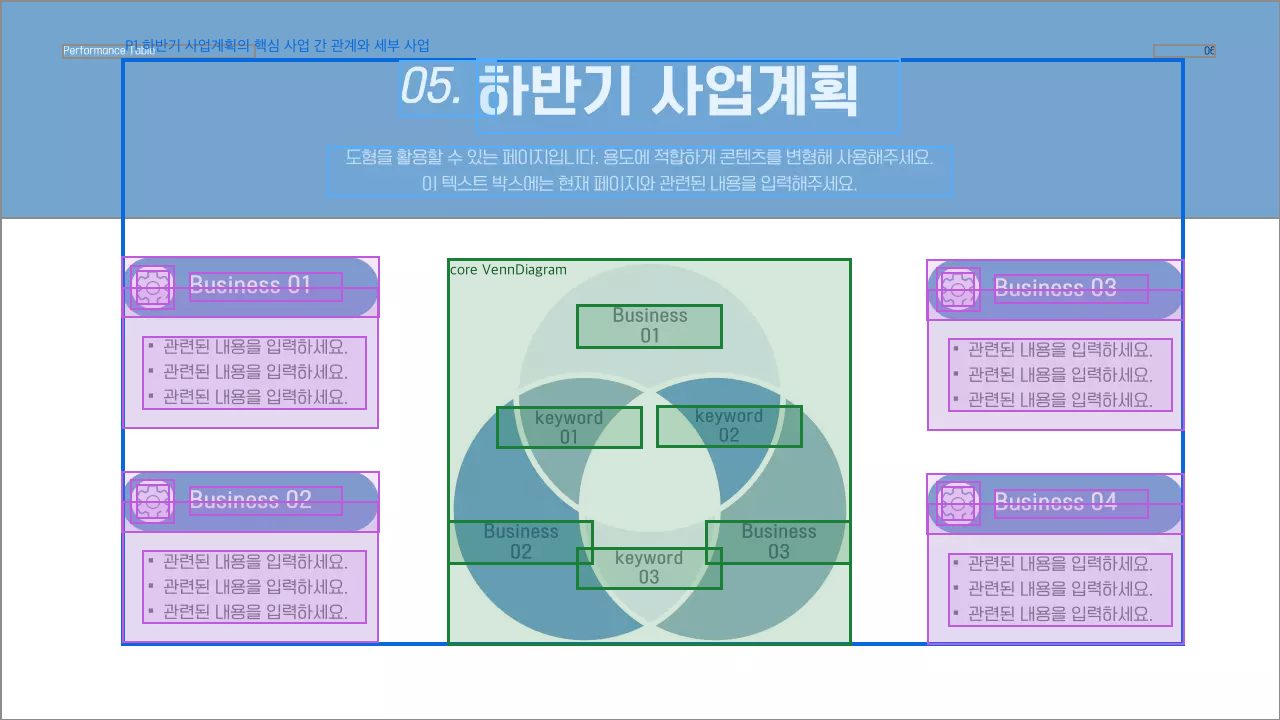
P1. 하반기 사업계획의 핵심 사업 간 관계와 세부 사업 항목을 제시한다
core 0 · VennDiagram n2(VectorGraphic) n33(Text "Business 01") n34(Text "Business 02") n35(Text "Business 03") n36(Text "keyword 01") n37(Text "keyword 02") n38(Text "keyword 03")
desc n4(Text "05.") n5(Text "하반기 사업계획") n6(Text "도형을 활용할 수 있는 페") — 사업계획 도표의 장 제목과 안내 문구를 제공한다
typed · List n9(ExtendableShape) n10(Shape) n11(Text "▪ 관련된 내용을 입력하세") n12(Text "Business 01") n13(Shape) n14(VectorGraphic) n15(ExtendableShape) n16(Shape) n17(Text "▪ 관련된 내용을 입력하세") n18(Text "Business 03") n19(Shape) n20(VectorGraphic) n21(ExtendableShape) n22(Shape) n23(Text "▪ 관련된 내용을 입력하세") n24(Text "Business 02") n25(Shape) n26(VectorGraphic) n27(ExtendableShape) n28(Shape) n29(Text "▪ 관련된 내용을 입력하세") n30(Text "Business 04") n31(Shape) n32(VectorGraphic) — 사업계획 항목을 반복 카드와 설명으로 상세 제시한다
장 크롬: n1() n3(ExtendableShape) n7(Text "Performance Ta") n8(Text "06") — 슬라이드 배경·상단 색상 밴드 및 문서명/쪽번호 크롬

175390 패키지 1

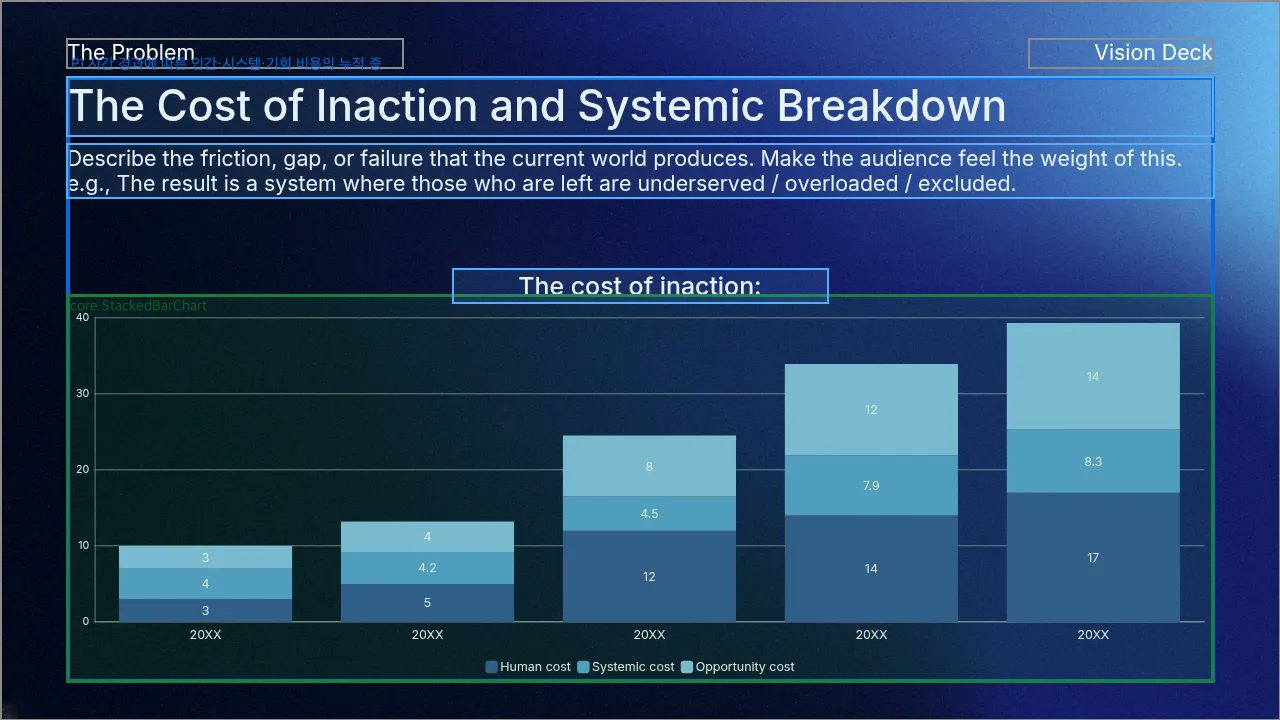
P1. 시간 경과에 따른 인간·시스템·기회 비용의 누적 증가를 보여준다
core 0 · StackedBarChart n3(Chart)
desc n2(Text "The cost of in") — 차트의 주제를 제목으로 제시한다
desc n6(Text "The Cost of In") — 차트가 전달하는 비용 문제를 장 제목으로 소개한다
desc n8(Text "Describe the f") — 차트가 설명할 시스템적 실패의 맥락을 보충한다
장 크롬: n1() n4(Text "The Problem") n5(Photo) n7(Text "Vision Deck") — 전체 배경과 문서/섹션 층위 레이블

175724 패키지 1

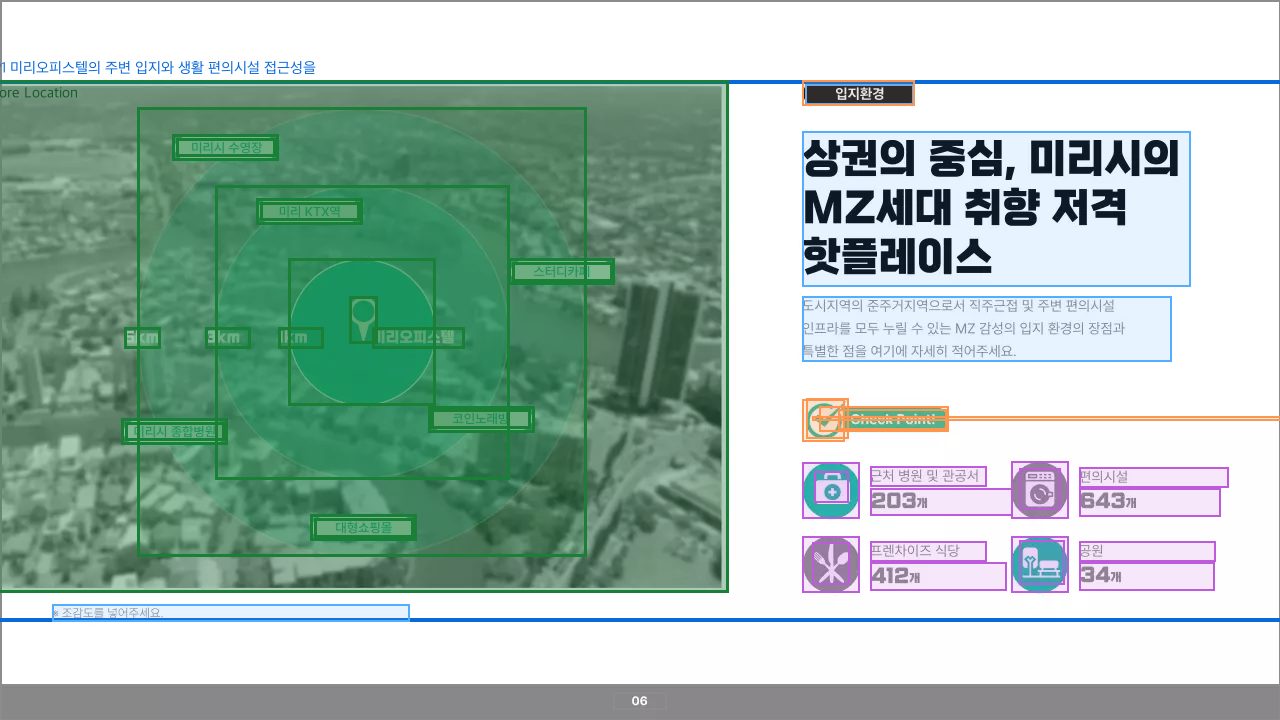
P1. 미리오피스텔의 주변 입지와 생활 편의시설 접근성을 보여준다
core 0 · Location n3(Photo) n4(FrameLayout) n26(Shape) n27(Shape) n28(Shape) n29(Text "미리오피스텔") n30(VectorGraphic) n31(Text "스터디카페") n32(Text "1km") n33(Text "3km") n34(Text "5km") n35(VectorGraphic) n36(Text "미리 KTX역") n37(VectorGraphic) n38(Text "미리시 수영장") n39(VectorGraphic) n40(Text "미리시 종합병원") n41(VectorGraphic) n42(Text "코인노래방") n43(VectorGraphic) n44(Text "대형쇼핑몰") n45(VectorGraphic)
desc n5(Text "상권의 중심, 미리시의 M") n6(Text "입지환경") n7(Text "도시지역의 준주거지역으로서") — 입지 환경의 핵심 메시지와 설명을 제공한다
desc n8(Text "※ 조감도를 넣어주세요.") — 입지 조감도에 대한 보조 주석이다
typed · BigNumber n9(Shape) n10(Text "프렌차이즈 식당") n11(Text "412 개") n12(VectorGraphic) n13(Shape) n14(Text "편의시설") n15(Text "643 개") n16(VectorGraphic) n18(Text "근처 병원 및 관공서") n19(Text "203 개") n20(Shape) n21(VectorGraphic) n22(Shape) n23(Text "공원") n24(Text "34 개") n25(VectorGraphic) — 주변 생활 편의시설의 종류별 수치를 요약한다
deco n17(VectorGraphic) n48(Shape) n49(Text "Check Point!") n50(Shape) n51(VectorGraphic) — 편의시설 수치 요약 구역을 장식하고 구분한다
deco n2(Shape) — 입지환경 분류 라벨의 배경을 만든다
장 크롬: n1() n46(ExtendableShape) n47(Text "06") — 슬라이드 전체 배경과 하단 쪽번호 바

176344 패키지 1

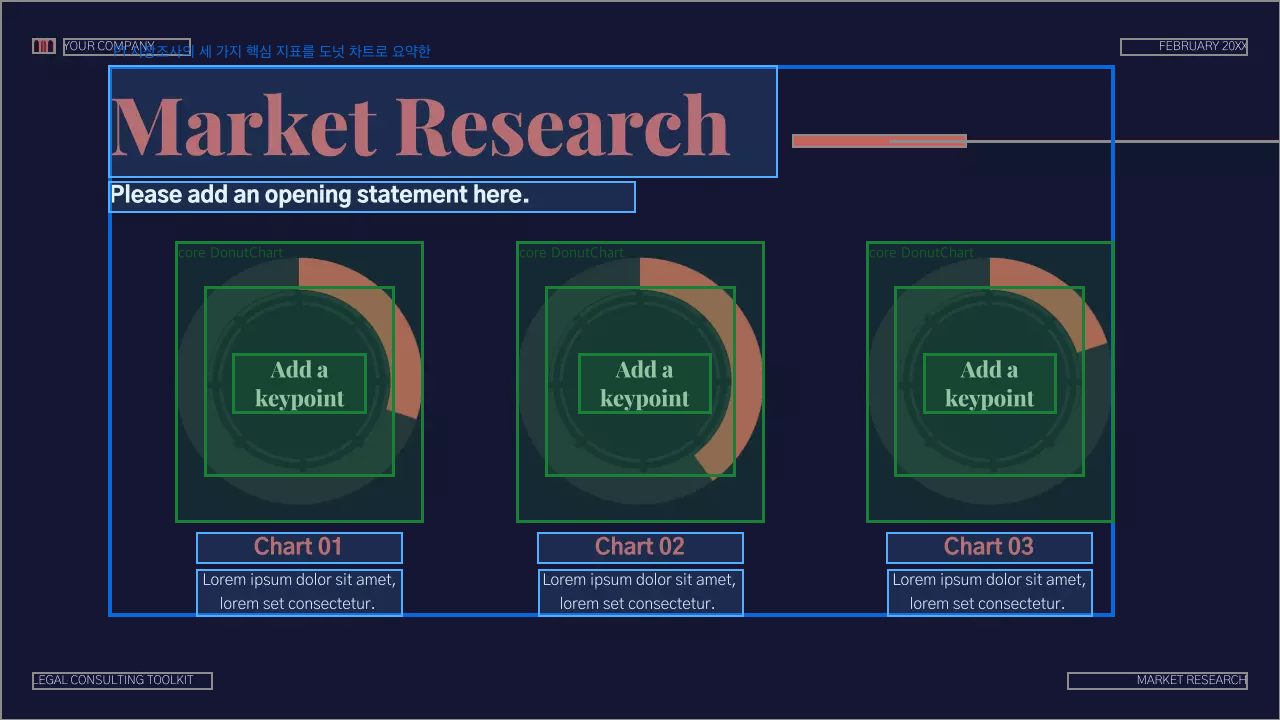
P1. 시장조사의 세 가지 핵심 지표를 도넛 차트로 요약한다 결합 증거: 동일한 도넛 차트 단위 세 개가 가로로 정렬되어 하나의 시장조사 요약 묶음을 이룬다.
core 0 · DonutChart n4(Chart) n5(Bitmap) n20(Text "Add a keypoint")
desc n18(Text "Chart 01") n19(Text "Lorem ipsum do") — 첫 번째 도넛 차트의 제목과 설명을 제공한다
core 1 · DonutChart n2(Chart) n3(Bitmap) n21(Text "Add a keypoint")
desc n16(Text "Chart 02") n17(Text "Lorem ipsum do") — 두 번째 도넛 차트의 제목과 설명을 제공한다
core 2 · DonutChart n6(Chart) n7(Bitmap) n25(Text "Add a keypoint")
desc n23(Text "Chart 03") n24(Text "Lorem ipsum do") — 세 번째 도넛 차트의 제목과 설명을 제공한다
패키지 공유 위성 (anchor=region · 다핵 전용)
desc n11(Text "Market Researc") n14(Text "Please add an ") — 세 도넛 차트로 구성된 시장조사 요약을 소개한다
장 크롬: n1() n8(Line) n9(ExtendableShape) n10(VectorGraphic) n12(Text "YOUR COMPANY") n13(Text "FEBRUARY 20XX") n15(Text "LEGAL CONSULTI") n22(Text "MARKET RESEARC") — 슬라이드 배경, 상단 로고·회사명·날짜, 장식 선, 하단 문서/섹션 표기

175113 패키지 3

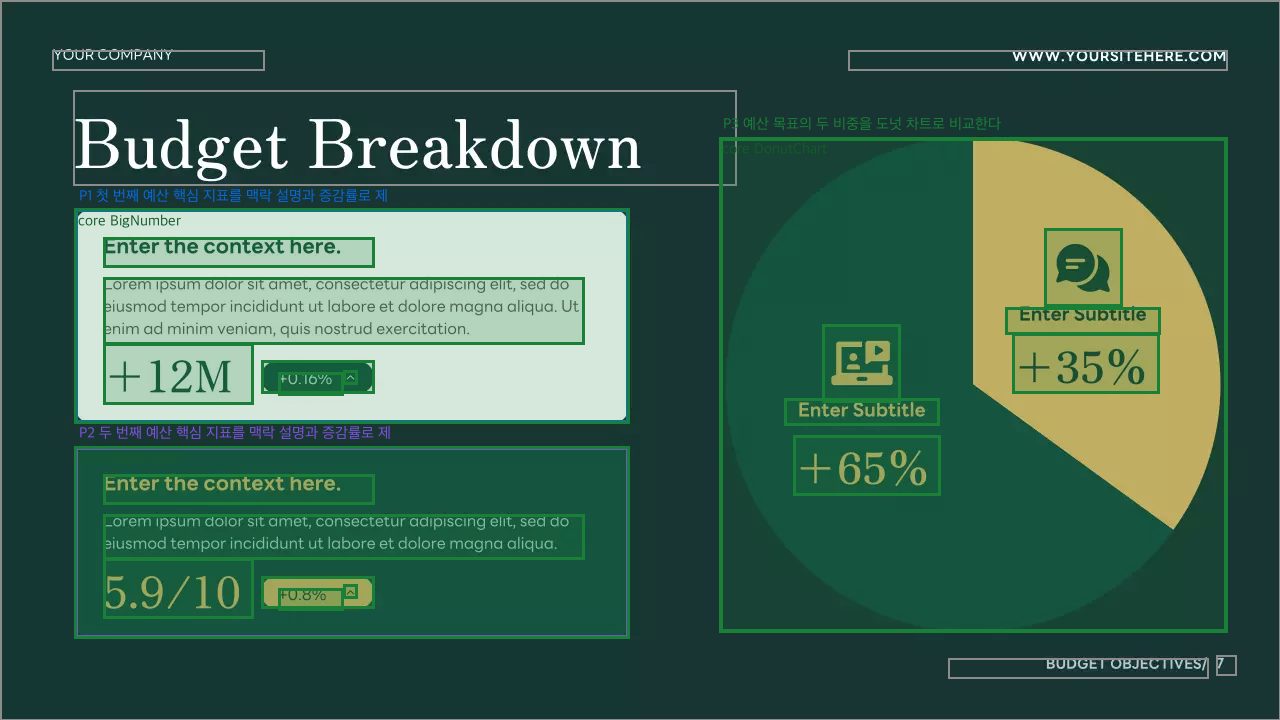
P1. 첫 번째 예산 핵심 지표를 맥락 설명과 증감률로 제시한다
core 0 · BigNumber n5(ExtendableShape) n11(Text "Lorem ipsum do") n12(Text "Enter the cont") n15(ExtendableShape) n16(VectorGraphic) n19(Text "+0.16%") n20(Text "+12M")
(위성 없음)
P2. 두 번째 예산 핵심 지표를 맥락 설명과 증감률로 제시한다
core 0 · BigNumber n6(ExtendableShape) n13(Text "Lorem ipsum do") n14(Text "Enter the cont") n17(ExtendableShape) n18(VectorGraphic) n21(Text "+0.8%") n22(Text "5.9/10")
(위성 없음)
P3. 예산 목표의 두 비중을 도넛 차트로 비교한다
core 0 · DonutChart n2(Chart) n3(VectorGraphic) n4(VectorGraphic) n23(Text "Enter Subtitle") n24(Text "+65%") n25(Text "Enter Subtitle") n26(Text "+35%")
(위성 없음)
장 크롬: n1() n7(Text "www.yoursitehe") n8(Text "Your company") n9(Text "Budget Objecti") n10(Text "7") n27(Text "Budget Breakdo") — 슬라이드 배경, 회사명·웹사이트·푸터 쪽번호 및 여러 예산 위젯을 아우르는 장 제목

175560 패키지 3

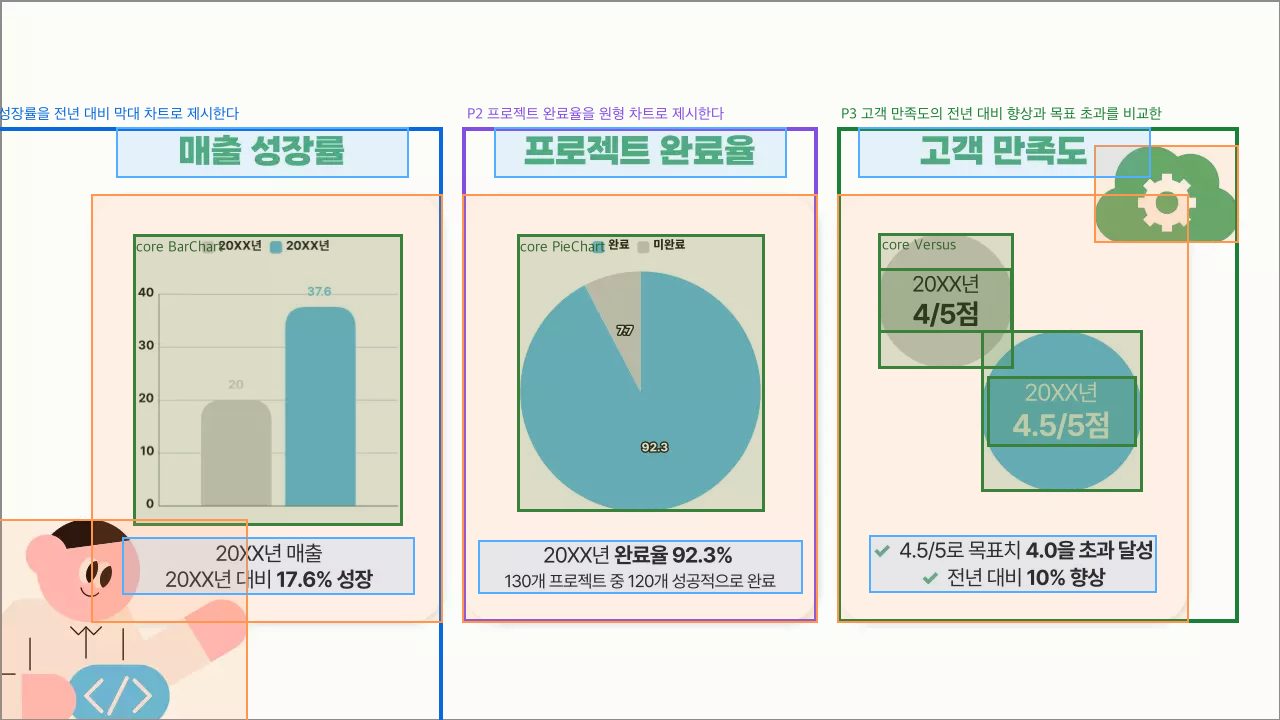
P1. 매출 성장률을 전년 대비 막대 차트로 제시한다
core 0 · BarChart n7(Chart)
deco n2(ExtendableShape) — 차트와 요약문을 담는 카드 배경이다
deco n10(VectorGraphic) — 매출 카드 주변 분위기를 꾸민다
desc n11(Text "매출 성장률") n12(Text "20XX년 매출 20XX년") — 차트의 주제와 성장 결론을 설명한다
P2. 프로젝트 완료율을 원형 차트로 제시한다
core 0 · PieChart n8(Chart)
deco n3(ExtendableShape) — 차트와 요약문을 담는 카드 배경이다
desc n13(Text "프로젝트 완료율") n14(Text "20XX년 완료율 92.") — 차트의 주제와 완료 결과를 설명한다
P3. 고객 만족도의 전년 대비 향상과 목표 초과를 비교한다
core 0 · Versus n5(ExtendableShape) n6(ExtendableShape) n16(Text "20XX년 4/5점") n17(Text "20XX년 4.5/5점")
deco n4(ExtendableShape) — 비교 지표와 설명을 담는 카드 배경이다
deco n9(VectorGraphic) — 고객 만족도 영역의 분위기를 꾸민다
desc n15(Text "고객 만족도") n18(Text "✓   4.5/5로 목표치") — 비교 지표의 주제와 목표 초과 결론을 설명한다
장 크롬: n1() — 슬라이드 전체 배경

175593 패키지 1

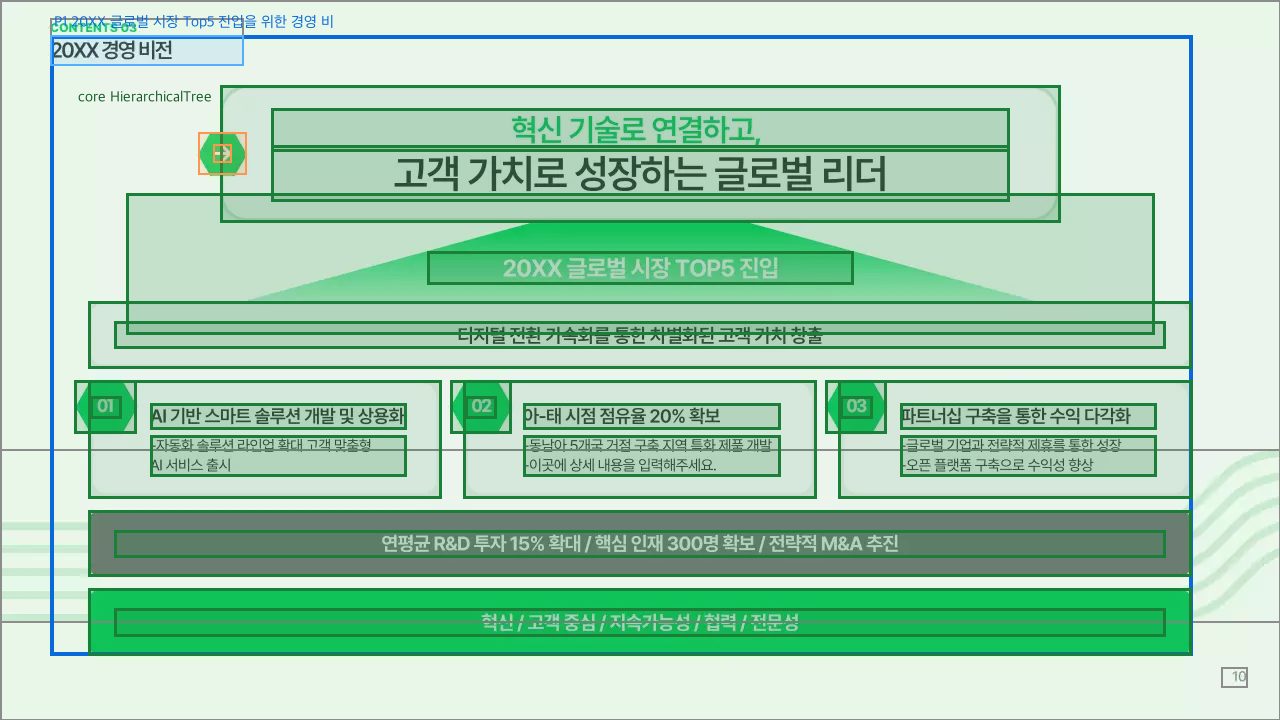
P1. 20XX 글로벌 시장 Top5 진입을 위한 경영 비전과 실행 전략 체계
core 0 · HierarchicalTree n4(ExtendableShape) n5(ExtendableShape) n8(Text "20XX 글로벌 시장 to") n9(ExtendableShape) n10(Text "디지털 전환 가속화를 통한") n11(ExtendableShape) n12(ExtendableShape) n13(Text "01") n14(ExtendableShape) n15(ExtendableShape) n16(Text "02") n17(ExtendableShape) n18(ExtendableShape) n19(Text "03") n20(Text "AI 기반 스마트 솔루션 ") n21(Text "-자동화 솔루션 라인업 확") n22(Text "아-태 시점 점유율 20%") n23(Text "-동남아 5개국 거점 구축") n24(Text "파트너십 구축을 통한 수익") n25(Text "-글로벌 기업과 전략적 제") n26(ExtendableShape) n27(Text "연평균 R&D 투자 15%") n28(ExtendableShape) n29(Text "혁신 / 고객 중심 / 지") n30(Text "고객 가치로 성장하는 글로") n31(Text "혁신 기술로 연결하고, ")
deco n6(ExtendableShape) n7(ExtendableShape) — 비전 문구를 강조하는 화살표 장식
desc n32(Text "20XX 경영 비전") — 경영 비전 구조를 소개하는 장 제목
장 크롬: n1() n2(VectorGraphic) n3(Text "10") n33(Text "contents 03") — 슬라이드 배경 장식, 쪽번호, 문서/섹션 표기

175604 패키지 1

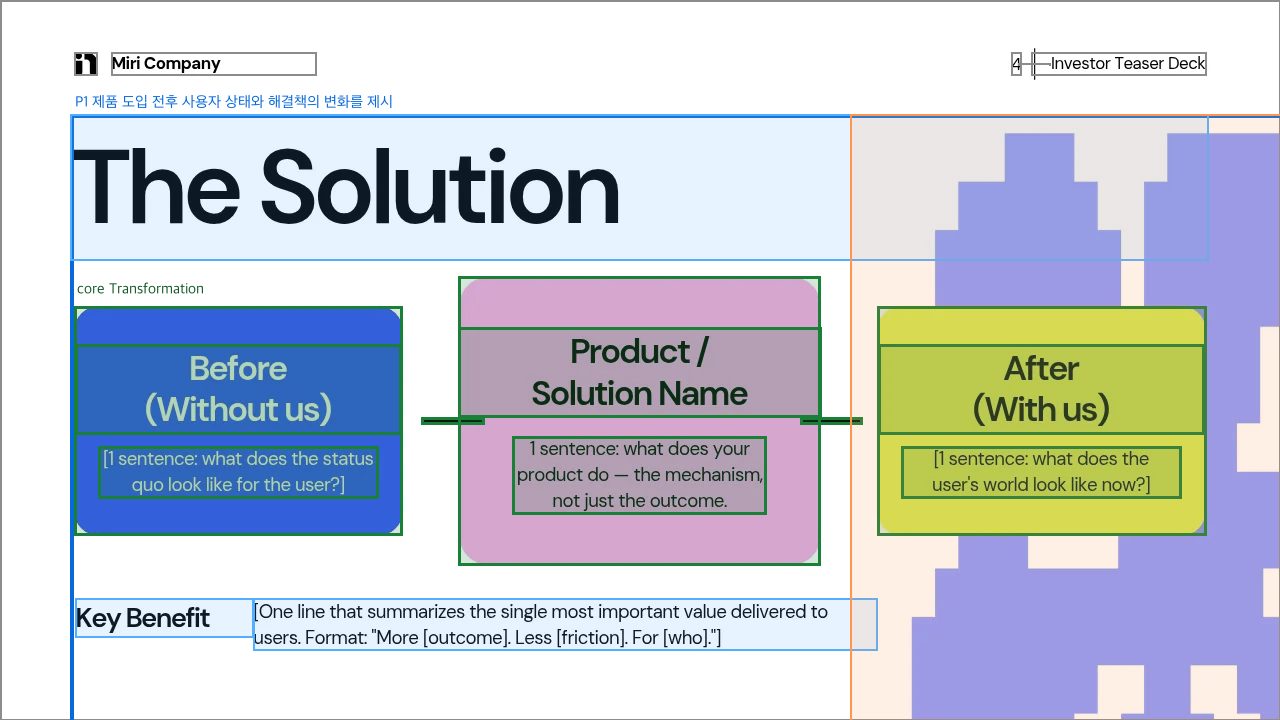
P1. 제품 도입 전후 사용자 상태와 해결책의 변화를 제시한다
core 0 · Transformation n3(Text "[1 sentence: w") n5(Text "After (With us") n8(Line) n9(Text "Before (Withou") n10(ExtendableShape) n11(Text "Product / Sol") n12(Text "[1 sentence: w") n15(ExtendableShape) n18(ExtendableShape) n19(Text "1 sentence: wh") n21(Line)
desc n16(Text "The Solution") — 전후 변화 해결책의 주제를 소개한다
desc n2(Text "Key Benefit") n13(Text "[One line that") — 변화가 제공하는 핵심 효익을 요약한다
deco n6(Bitmap) — 해결 후 상태의 분위기를 꾸민다
장 크롬: n1() n4(VectorGraphic) n17(Text "Miri Company") n7(Text "4") n14(Line) n20(Text "Investor Tease") — 슬라이드 배경, 회사 로고·문서명·쪽번호 크롬

175038 패키지 1

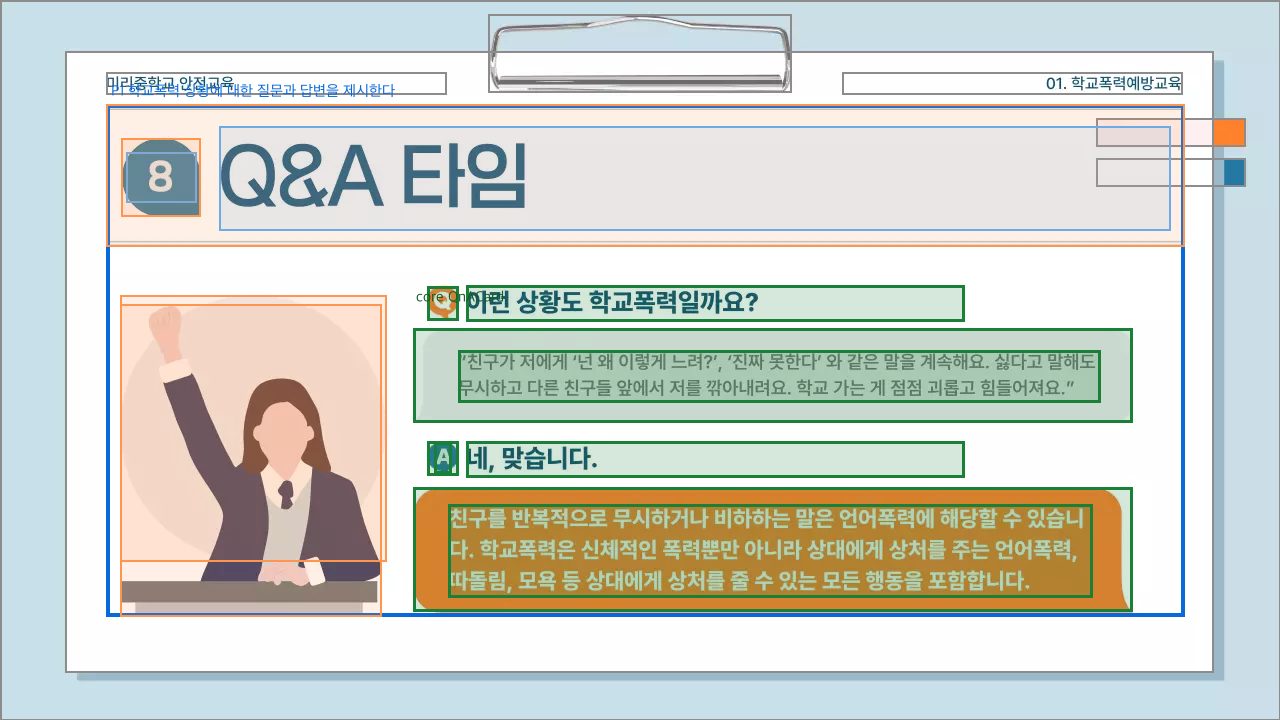
P1. 학교폭력 상황에 대한 질문과 답변을 제시한다
core 0 · QnACard n4(Shape) n14(Shape) n15(Bitmap) n17(Text "이런 상황도 학교폭력일까요") n18(Text "“친구가 저에게 ‘넌 왜 ") n19(Text "친구를 반복적으로 무시하거") n20(Bitmap) n21(Text "네, 맞습니다.") n22(Text "A")
desc n8(Text "Q&A 타임") n9(Text "8") — Q&A 콘텐츠의 제목과 회차를 소개한다
deco n5(ExtendableShape) n13(VectorGraphic) — 질문·답변 장면의 분위기를 꾸민다
deco n6(VectorGraphic) n7(Shape) — 제목 영역을 시각적으로 강조한다
장 크롬: n1() n2(VectorGraphic) n3(ExtendableShape) n10(Text "01. 학교폭력예방교육") n11(VectorGraphic) n12(VectorGraphic) n16(Text "미리중학교 안전교육") — 슬라이드 배경·용지 프레임·상단 문서명/섹션명·클립과 우측 탭 장식

175173 패키지 1

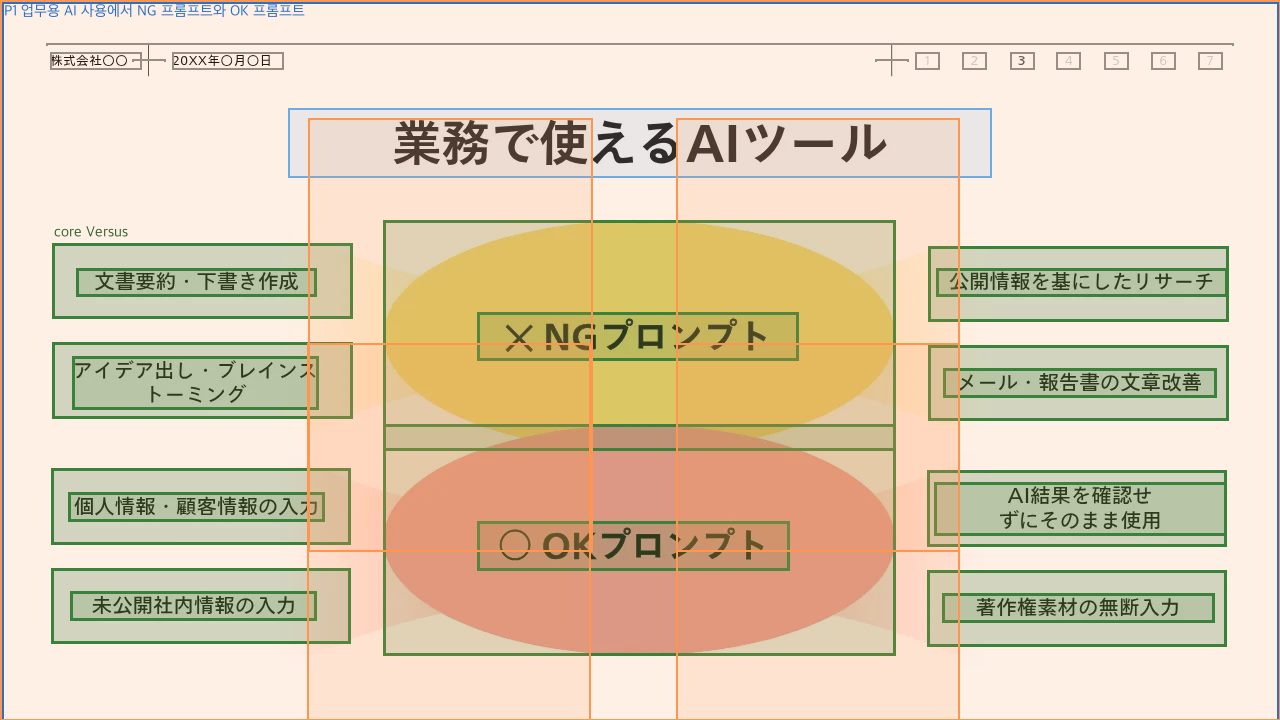
P1. 업무용 AI 사용에서 NG 프롬프트와 OK 프롬프트 사례를 대비한다
core 0 · Versus n3(ExtendableShape) n6(ExtendableShape) n8(Text "メール・報告書の文章改善") n9(Text "AI結果を確認せ ずにそのま") n11(Text "個人情報・顧客情報の入力") n12(Text "公開情報を基にしたリサーチ") n14(ExtendableShape) n15(Text "○ OKプロンプト") n16(ExtendableShape) n19(Text "文書要約・下書き作成") n22(ExtendableShape) n24(ExtendableShape) n26(Text "著作権素材の無断入力") n27(ExtendableShape) n29(ExtendableShape) n30(Text "✕ NGプロンプト") n33(Text "アイデア出し・ブレインストー") n34(ExtendableShape) n36(Text "未公開社内情報の入力") n38(ExtendableShape)
desc n10(Text "業務で使えるAIツール") — NG/OK 프롬프트 대비의 주제를 소개한다
deco n1() n13(Bitmap) n25(Bitmap) n31(Bitmap) n32(Bitmap) — 양측 사례와 중앙 대비 항목을 시각적으로 연결하고 배경을 구성한다
장 크롬: n2(Text "2") n4(Text "3") n5(Text "4") n7(Line) n17(Text "6") n18(Text "1") n20(Line) n21(Text "20XX年〇月〇日") n23(Text "7") n28(Text "株式会社〇〇") n35(Text "5") n37(Line) — 회사명·날짜·상단 진행 표식·구분선으로 이루어진 문서/장 크롬

175372 패키지 1

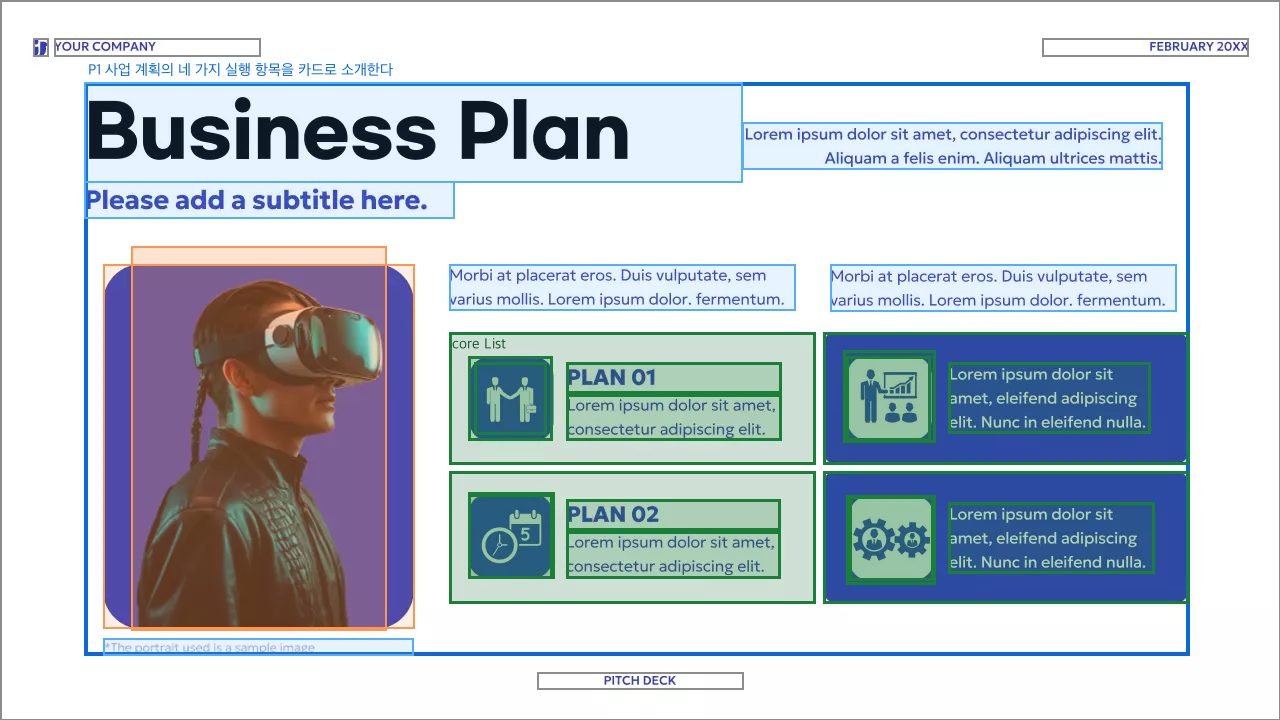
P1. 사업 계획의 네 가지 실행 항목을 카드로 소개한다
core 0 · List n2(ExtendableShape) n4(ExtendableShape) n5(ExtendableShape) n8(ExtendableShape) n9(ExtendableShape) n10(ExtendableShape) n11(ExtendableShape) n12(ExtendableShape) n13(VectorGraphic) n14(VectorGraphic) n15(VectorGraphic) n16(VectorGraphic) n25(Text "Lorem ipsum do") n26(Text "PLAN 01") n27(Text "Lorem ipsum do") n28(Text "PLAN 02") n29(Text "Lorem ipsum do") n30(Text "Lorem ipsum do")
desc n18(Text "Business Plan") n22(Text "Please add a s") n23(Text "Morbi at place") n24(Text "Morbi at place") n31(Text "Lorem ipsum do") — 사업 계획 카드 목록의 제목과 도입 설명을 제공한다
deco n3(Photo) n7(ExtendableShape) n17(FrameLayout) — 사업 계획 소개 영역의 분위기를 꾸민다
desc n32(Text "*The portrait ") — 소개 이미지의 출처성 캡션을 제공한다
장 크롬: n1() n6(VectorGraphic) n19(Text "YOUR COMPANY") n20(Text "PITCH DECK") n21(Text "FEBRUARY 20XX") — 슬라이드 배경, 회사 로고·문서명, 덱 표기, 날짜

175395 패키지 1

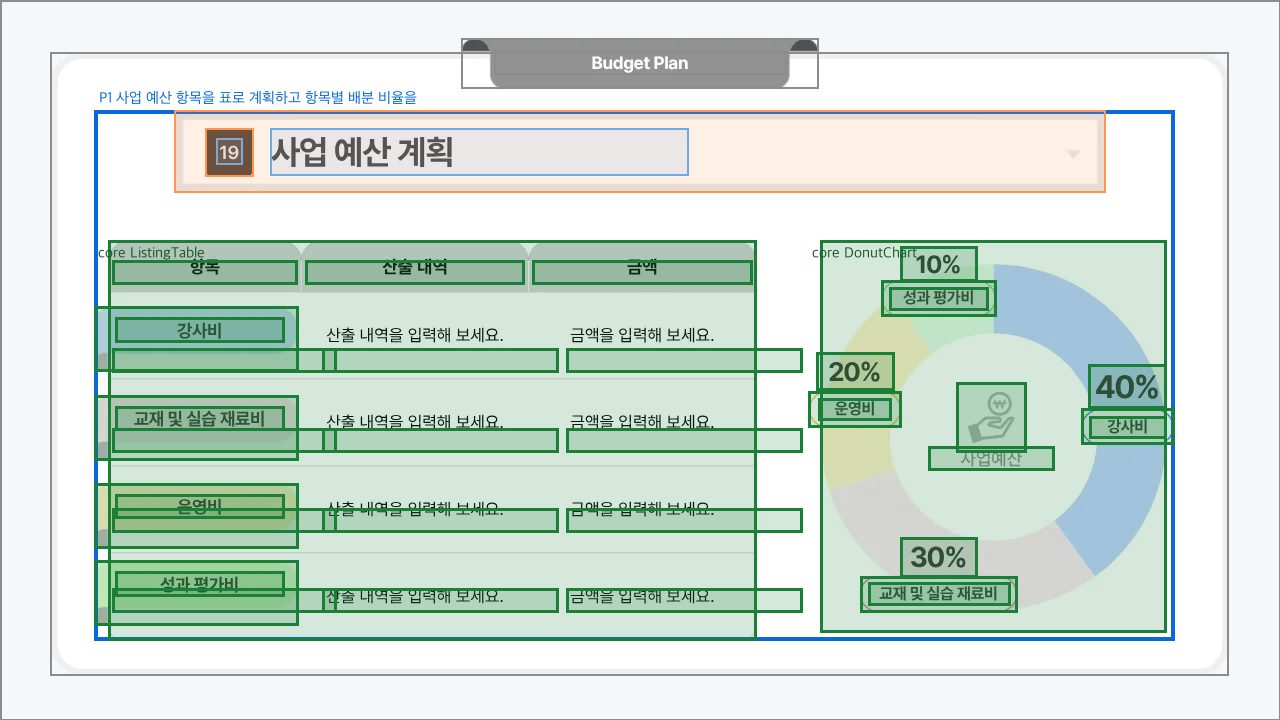
P1. 사업 예산 항목을 표로 계획하고 항목별 배분 비율을 도넛 차트로 보여준다 결합 증거: 좌측 표와 우측 도넛 차트가 강사비·교재 및 실습 재료비·운영비·성과 평가비라는 동일한 예산 항목을 공유하며, 한 사업예산 계획의 입력과 배분 요약을 함께 구성한다.
core 0 · ListingTable n5(Table) n6(Text "항목") n7(Text "산출 내역") n8(Text "금액") n9(Text) n10(Text "산출 내역을 입력해 보세요") n11(Text) n12(Text "금액을 입력해 보세요.") n13(Text) n14(Text) n15(Text "산출 내역을 입력해 보세요") n16(Text "산출 내역을 입력해 보세요") n17(Text "산출 내역을 입력해 보세요") n18(Text "금액을 입력해 보세요.") n19(Text "금액을 입력해 보세요.") n20(Text "금액을 입력해 보세요.") n28(VectorGraphic) n29(Text "강사비") n30(VectorGraphic) n31(Text "교재 및 실습 재료비") n34(VectorGraphic) n35(Text "성과 평가비") n45(VectorGraphic) n46(Text "운영비")
(위성 없음)
core 1 · DonutChart n3(VectorGraphic) n4(Text "40%") n21(ExtendableShape) n22(Text "운영비") n23(ExtendableShape) n24(Text "성과 평가비") n25(Chart) n26(ExtendableShape) n27(Text "강사비") n32(ExtendableShape) n33(Text "교재 및 실습 재료비") n37(Text "10%") n38(Text "사업예산") n41(Text "20%") n44(Text "30%")
(위성 없음)
패키지 공유 위성 (anchor=region · 다핵 전용)
desc n40(Text "사업 예산 계획") n47(Text "19") — 표와 차트로 구성된 사업 예산 계획을 제목과 번호로 소개한다
deco n2(ExtendableShape) n42(VectorGraphic) — 제목 영역의 번호 배지와 배경 프레임을 장식한다
장 크롬: n1() n36(Text "Budget Plan") n39(VectorGraphic) n43(ExtendableShape) — 문서명 탭과 슬라이드 전체 배경·외곽 프레임